Free AI Photo Colorizer: Colorize Black and White Photos
Upload an old photo, choose a preset and get a natural color version in about a minute. New accounts colorize their first photo free.
Sign up to create your first image free with Nano Banana 2 Lite.
Image Preview
Your generated images will appear here.
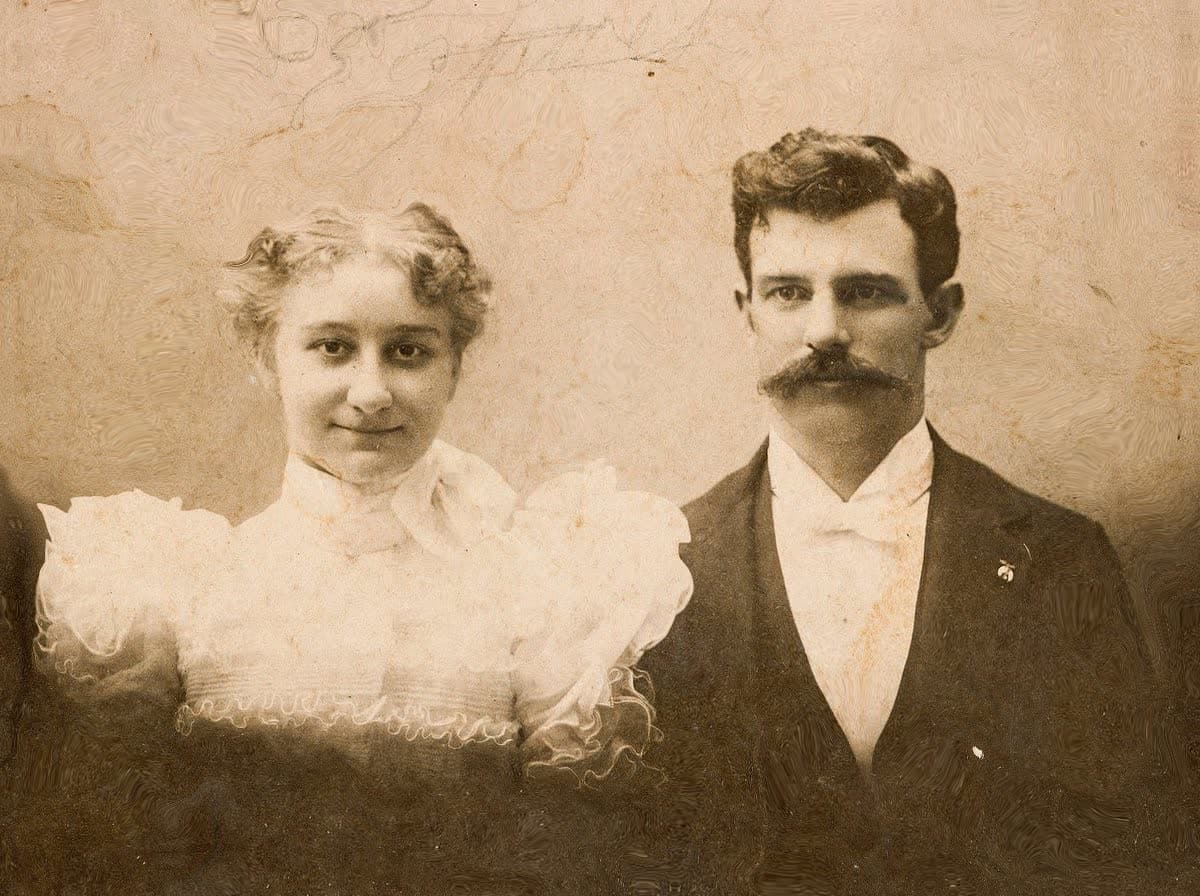
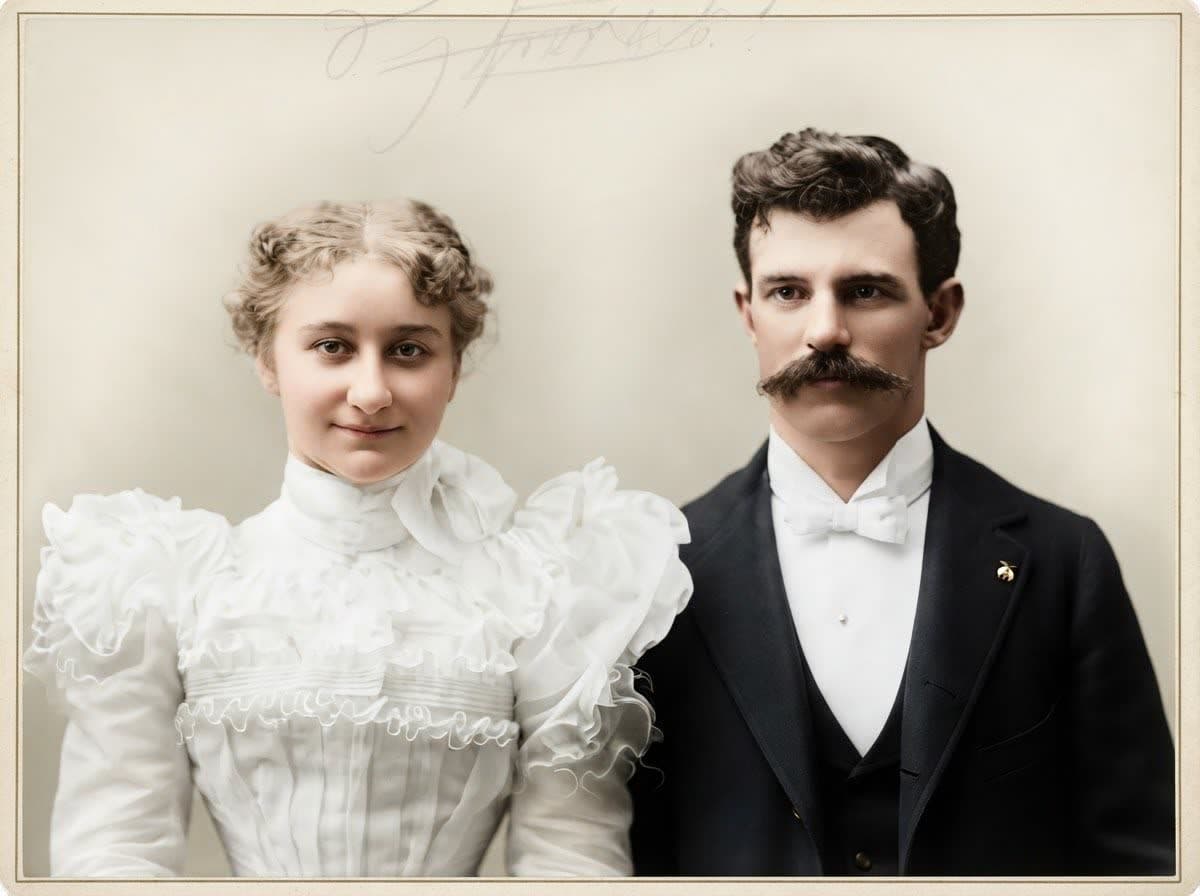
Photo colorizer · Updated
What this photo colorizer does
Froging AI’s photo colorizer adds realistic color to black-and-white and sepia photos in about a minute. Upload a scan, pick Natural color, Restore + colorize or Vintage film color, and download the result. Colors are AI predictions, not historical records, so check faces and clothing against the original.
It works best on family portraits, wedding and school photos, old street scenes and landscapes. Under the hood it is the same image editor as our AI Image Editor, with the colorization instructions written for you.
- Price
- 1 free photo for new accounts, then 4 credits (about $0.20) per photo
- Time
- About a minute per photo
- Input
- JPG, PNG or WebP up to 10MB
- Presets
- Natural color · Restore + colorize · Vintage film color
- Model
- Nano Banana 2 Lite (Google) image editing
- Watermark
- No visible watermark on the download
Real results, one attempt each
Black-and-white photos before and after colorization
Each result below came from a single run of the preset named on the card, with no retouching afterwards. The originals are public-domain photos, linked under each example.
 OriginalRestore + colorize
Faded wedding portrait, restored and colorized
The yellowed card and stains were removed in the same pass. The handwriting at the top was kept, faintly.
Original: Unknown photographer, “Mr. and Mrs. Ova Mead, wedding portrait”, public domain via Wikimedia Commons
 Original
 Natural color
Railway porter portrait, 1943
A sharp, clean print needs color only. The face, cap badge and the breath in the cold air all came through unchanged; the skin tone and the navy coat are the model’s estimate.
 Original
 Vintage film color
Mountain landscape in vintage film color
Muted greens and a pale sky. Landscapes have fewer “known” colors, so a softer palette usually looks more believable.
Original: Ansel Adams, “The Tetons and the Snake River” (1942), U.S. National Archives, public domain
Three steps
How to colorize a black-and-white photo
- 01
Upload a scan or phone photo
JPG, PNG or WebP up to 10MB. A flat, glare-free scan of the print gives the model the most detail to work with.
- 02
Choose a preset
Natural color for clean photos, Restore + colorize for faded or damaged prints, Vintage film color for a softer period look. If you know a real color, add it under “Add known colors”.
- 03
Create and download
The result appears in about a minute and is saved in History. Compare it with the original before you share it.
| Preset | Use it for | What it changes |
|---|---|---|
| Natural color | Clean prints, digital scans, photos you want to keep authentic | Adds color only; dust and paper texture stay |
| Restore + colorize | Faded, yellowed, stained or scratched prints | Cleans damage and fixes contrast, then adds color |
| Vintage film color | Landscapes, street scenes, a period look | Soft, muted colors like an early color slide |
Before you share it
5 ways colorization goes wrong, and how to fix them
A black-and-white photo only records brightness. Many different colors have the same grey, so every colorizer has to guess. These are the guesses to check.
Read the full colorizing guide- 1
Skin tones drift
Sepia and orthochromatic film record skin darker or lighter than it was. If a face looks too orange or grey, run the Natural preset again, or add “light, neutral skin tone” under Add known colors.
- 2
Clothing colors are guesses
A grey dress in a black-and-white photo could have been blue, green or red. The model picks a plausible color, not the real one. If a relative remembers the color, type it under Add known colors.
- 3
Uniforms, flags and signs need facts
Military insignia, team colors and shop signs had specific colors. Look them up and type them under Add known colors instead of trusting the guess.
- 4
Yellowed prints confuse the model
Heavy yellowing or a sepia cast can be read as warm light. Use Restore + colorize so the cast is removed before the color is added.
- 5
Small faces in group photos
Faces only a few pixels wide can lose detail. Scan at a higher resolution, or crop one person and colorize that crop separately.
Choosing a method
AI colorizer vs. Photoshop vs. hand-tinting
| Method | Time per photo | Color accuracy | Best for |
|---|---|---|---|
| AI photo colorizer (this page) | About a minute | Plausible, not verified | Family photos, quick restorations, many prints |
| Photoshop Neural Filters / manual layers | 30 minutes to several hours | As accurate as your research | A single important photo, professional work |
| Hand-tinting (historical method) | Hours to days | Artist’s interpretation | Craft and display pieces |
For one irreplaceable photo, a good approach is to colorize it here first, then fix the few colors you know are wrong in an editor. That takes minutes instead of hours.
After colorizing
More you can do with an old photo
Photo colorizer FAQ
Cost, accuracy, sign-up and privacy.
What is a photo colorizer?
A photo colorizer is a tool that adds color to a black-and-white or sepia photo. AI colorizers predict a plausible color for each area, such as skin, sky, foliage and clothing, from the brightness and shapes in the image. The result is an informed guess, not a record of the original colors.
Is this photo colorizer free?
New Froging AI accounts get one free image with Nano Banana 2 Lite, which this colorizer uses, while the daily free allowance lasts. After that, each colorized photo uses 4 credits. The smallest one-time pack is $9.99 for 200 credits, which covers 50 photos, or about $0.20 each.
Do I need to sign up?
You can upload a photo and choose a preset without an account. Sign in when you click Colorize photo; your photo and settings are kept, so you only need to click it again. The account is where the free image and your History are stored.
How accurate are AI colorized photos?
They look plausible but are not historically verified. Skin, sky and vegetation are usually close. Clothing, cars, painted walls and uniforms are guesses unless you type the real color under Add known colors. Do not present a colorized photo as an original color record.
Can it restore damaged or faded old photos too?
Yes. The Restore + colorize preset removes scratches, dust, stains and yellowing, recovers faded contrast and then adds color in one pass. Severe tears or missing areas may be filled in by the model, so compare faces closely with the original.
Will it change people’s faces?
The presets instruct the model to keep faces, expressions and poses unchanged, and most results do. Generative models can still smooth or slightly reshape small faces. Check each face against the original, especially in group photos, and run it again if something looks off.
What file types and sizes can I upload?
JPG, PNG and WebP up to 10MB. The result keeps the shape of your photo, so portraits stay portrait and panoramas stay wide; nothing is cropped to a square. Output is standard resolution, about 1 megapixel.
Are my photos private?
Uploads are used to create your image and are stored with your account so the result can appear in your History. Froging AI does not publish your photos. See the privacy policy for retention and deletion requests.
Have a box of old photos?
Start with one. Your first colorization is free on a new account.