A still image leads an animation
Use the starting frame to establish the subject and crop. Then describe movement. A camera push toward a product is a different request from asking the product itself to rotate.
Making a photo move and making it speak are different tasks. Magic Hour offers tools for both. Choose from the input you have and the result you need.
Generator powered by Froging AI · Independent of Magic Hour
This generation uses 15 credits. New accounts start with 0 credits.
Citrus Soda Pop
Generated example
Explore Magic Hour
Magic Hour groups several image and video tasks under one platform. Image animation begins with a still composition; a talking-photo task adds speech; lip sync works around the timing of an audio track. The tools share a visual medium, but they do not solve the same problem.
Use the starting frame to establish the subject and crop. Then describe movement. A camera push toward a product is a different request from asking the product itself to rotate.
For a speaking portrait, prepare the line and its delivery before judging facial movement. A convincing still portrait does not tell you whether the mouth and expression will suit the voice.
Synchronization is about timing across the clip. Listen and watch together, especially at pauses and the ends of phrases. A mouth that moves continuously is not necessarily following the speech.
A face-swap tool changes identity in existing visual material. That is separate from adding motion or syncing dialogue. Decide which transformation is actually needed before choosing a tool.
A toy waving or a product reveal is an animation task. Describe the moving part and what should remain still around it.
This is a speech-led task. Prepare clear audio or text and assess both timing and facial behavior, rather than accepting any motion as a successful result.
Leave room for the requested movement. A hand already cut off by the frame gives the next tool less visual information when the subject gestures.
For an object animation, choose one readable action. For a speaking portrait, keep the focus on delivery before asking for a large head turn or camera move.
Track packaging and accessories in an object shot; inspect mouth timing in a speech task. The right review depends on the operation you asked the tool to perform.
Made with Froging AI
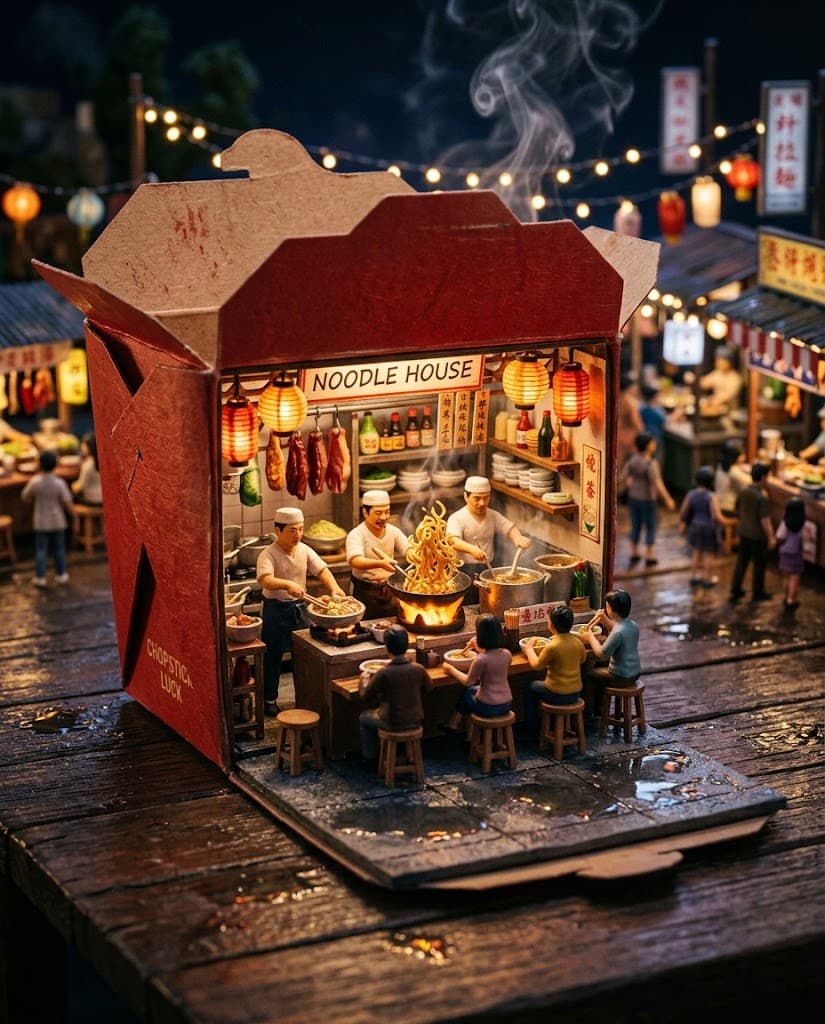
The citrus preview, miniature market, and portrait demonstrate ordinary image-to-video tasks. The portrait is not a lip-sync sample, and these clips do not use Magic Hour’s talking-photo tools.
 Original
Seedance 2.0 Mini
The market contains several small actions inside a fixed composition. Follow the steam and miniature figures, then check whether the box and stall keep their shape.
Bring the miniature noodle market to life: the center cook tosses noodles once above the wok, tiny diners gesture naturally, steam curls upward, lanterns sway, and puddle reflections shimmer. Slow macro camera push-in. Preserve the red takeout box, miniature scale, characters, layout, and warm night atmosphere.
 Original
Seedance 2.0 Mini
This example asks for a glance and small expression change, not speech. It is useful for judging portrait motion without confusing it with audio synchronization.
The woman takes one small step forward, glances back into the camera and gives a brief natural smile. Slight handheld compact-camera movement and autofocus breathing; fluorescent lights flicker subtly. Preserve her exact identity, face, hair, headphones, blue jacket, store layout, direct-flash look, and framing.
If you want to try image or video creation here, Froging provides its own generators. Here is how the workflows differ.
Swipe the table to compare both tools.
| What matters | Magic Hour | Froging AI |
|---|---|---|
| Creative scope | Image and video tools plus specialized transformations. | Image generation, reference editing, and short-video creation. |
| Image animation | A starting image with optional motion direction. | A reference image and prompt with supported model controls. |
| Speech-led tools | Talking-photo and lip-sync workflows. | Audio options depend on the video model; no dedicated lip-sync tool. |
| Next steps | Move between the relevant tools for each transformation. | Download a generated asset or develop another image or clip. |
Product descriptions are based on published information, not a hands-on comparison. Available options depend on the tool, model, and plan.
Yes. Its image-to-video workflow accepts a starting image and motion direction. Inspect the output for changes in important details.
Lip sync is driven by speech timing. General image animation may involve a camera move or subject action without any spoken dialogue.
Use a clear subject, deliberate framing, and enough space for the intended motion. Avoid relying on tiny text as the main visual detail.
No. The embedded generator is Froging AI’s independent image-to-video tool. It does not connect to Magic Hour’s specialized tools or account.
Check the generation cost before you start.
Try Froging video generation