AI Diwali Photo Generator
Upload a selfie or family photo, pick a Diwali scene and get a festive portrait in about a minute. Your face stays the same. New accounts get their first image free. No photo? Use a prompt
Sign up to create your first image free with Nano Banana 2 Lite.
Image Preview
Your generated images will appear here.
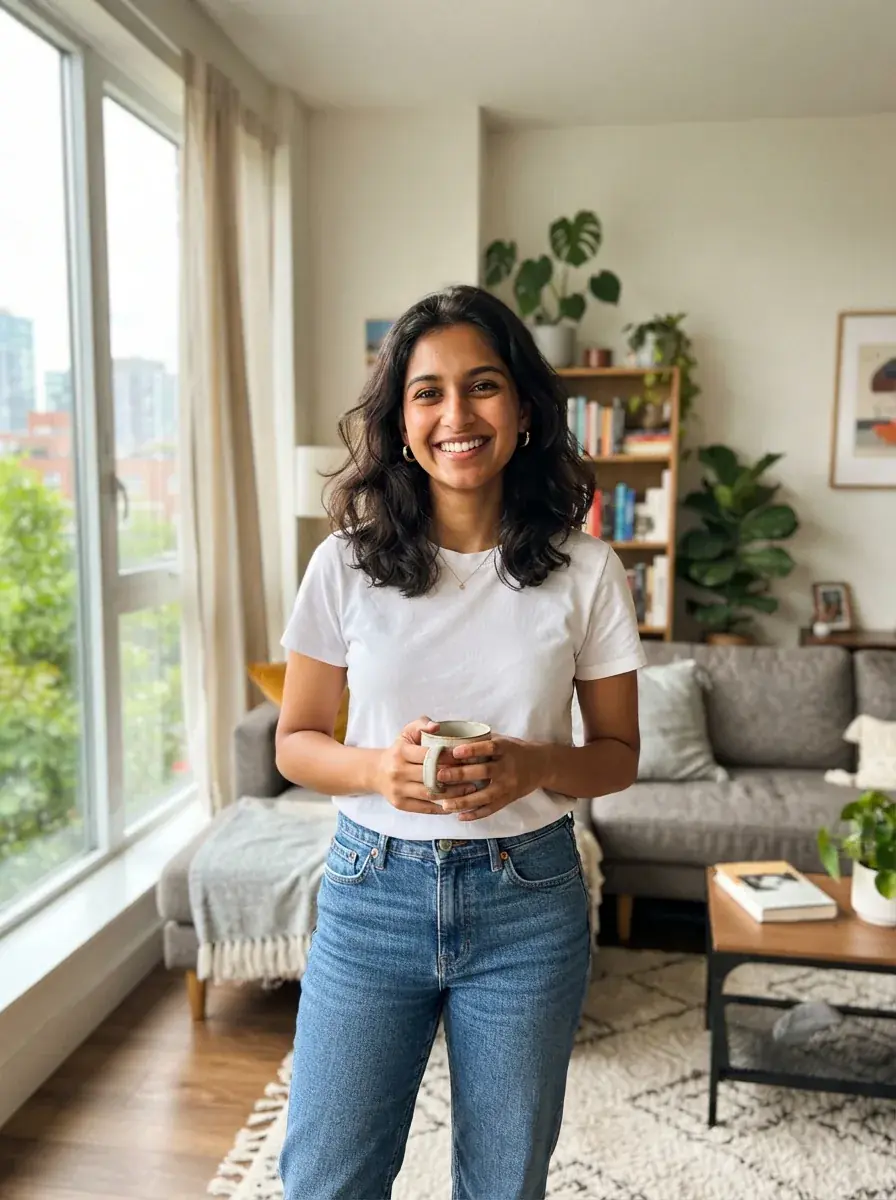
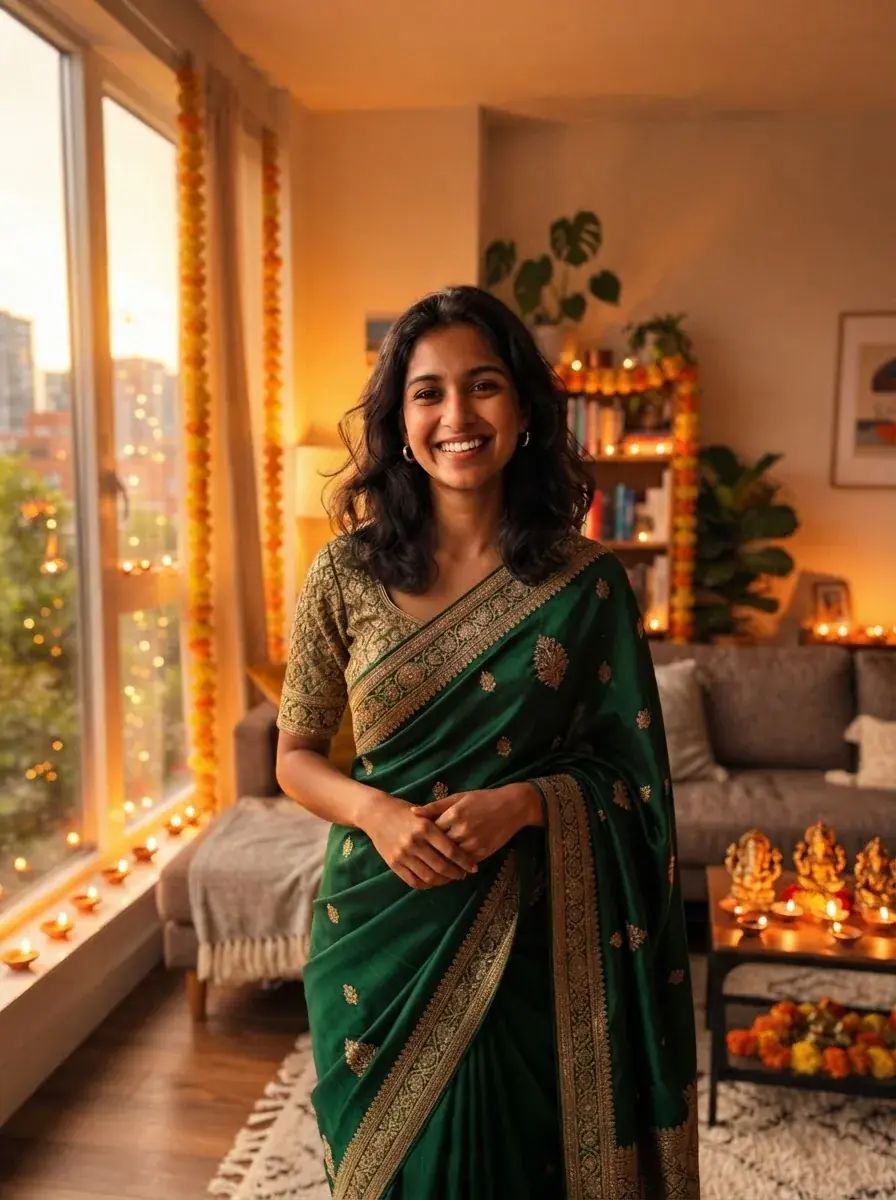
Diwali photos · Updated
What this Diwali photo generator does
Froging AI’s Diwali photo generator edits your own photo into a Diwali scene: a festive outfit, rows of lit diyas, a rangoli at the door, sparklers at night or a greeting card with “Happy Diwali” on it. It changes the clothes, background and lighting and keeps your face, so the result still looks like you.
Use it for a WhatsApp or Instagram greeting, a family photo when not everyone could be home, or a profile picture for the festival week. If you would rather start from a written idea than from a photo, use the Diwali prompt collection instead. Browse Diwali prompts.
Diwali falls in October or November, on the new-moon night of the Hindu month of Kartik. The festival runs five days, from Dhanteras to Bhai Dooj, with Lakshmi Puja on the main night.
- Price
- 1 free image for new accounts, then 4 credits (about $0.20) per image
- Time
- About a minute per image
- Input
- One photo: JPG, PNG or WebP up to 20MB
- Scenes
- Festive outfit + diyas · Rangoli at the door · Sparklers at night · Lanterns + fairy lights · Happy Diwali card
- Model
- Nano Banana 2 Lite (Google) image editing
- Watermark
- No visible watermark on the download
Real results, one attempt each
One photo, five Diwali scenes
All five results below started from the same casual photo, with one click on each scene and no extra detail. Each is a single attempt.
OriginalFestive outfit + diyasFestive outfit + diyas
The room was kept and decorated for the festival; the white t-shirt became an emerald silk saree.
Original Rangoli at the door
A new setting at the front door, with a rangoli, diyas and a marigold toran.
Original Sparklers at night
Night light from the sparkler on the face, with fireworks through the window.
Original Lanterns + fairy lights
Paper lanterns and string lights on a balcony, city lights blurred behind.
Original Happy Diwali card
A ready-to-send card with “Happy Diwali” spelled correctly at the top.
Three steps
How to make a Diwali photo with AI
- 01
Upload a photo
A clear photo where faces are well lit works best. Selfies, couple photos and family photos of up to about five people all work.
- 02
Pick a Diwali scene
Choose the outfit and diyas, the rangoli, sparklers, lanterns or the greeting card. Add a detail if you want a specific color or outfit.
- 03
Create and download
The result is ready in about a minute. Download it, or run it again with another scene for a set of greetings.
| Scene | Best for | What it adds |
|---|---|---|
| Festive outfit + diyas | Solo portraits, profile pictures | New festive clothes, diyas and marigolds indoors |
| Rangoli at the door | Family and couple photos | A rangoli, diyas and a toran at the entrance |
| Sparklers at night | Kids, friends, night selfies | Sparklers, fireworks and warm firelight on the face |
| Lanterns + fairy lights | Close-up selfies | Paper lanterns, string lights and soft bokeh |
| Happy Diwali card | WhatsApp and social greetings | A card layout with “Happy Diwali” text |
Before you create
Tips for a Diwali photo that still looks like you
The model rebuilds the clothes, light and background. These choices decide whether the face survives that.
- 1
Start with a sharp, front-lit face
Faces in shadow or turned far away are the ones most likely to drift. A daylight selfie gives better results than a dim party photo.
- 2
Name the outfit if it matters
Without a detail the model picks the outfit. Write “a green Banarasi saree” or “a cream kurta with a Nehru jacket” to choose it yourself.
- 3
Keep groups small
Each extra face is one more to keep accurate. For a big family, make two or three smaller photos rather than one crowded one.
- 4
Check the text on cards
The card preset asks for “Happy Diwali” spelled exactly. If a letter comes out wrong, run it again rather than editing the image.
- 5
Keep it honest
Only upload photos of people who are happy to be edited, and tell them it is an AI picture when you send it.
Keep going
More for Diwali
Diwali photo generator FAQ
Cost, likeness, outfits and privacy.
Is the Diwali photo generator free?
New accounts create their first image free. After that each image uses 4 credits on Nano Banana 2 Lite; the smallest credit pack is $9.99 for 200 credits, about 50 images.
Will the result still look like me?
Every scene tells the model to keep your face, skin tone, expression and pose. It works best with a sharp, well-lit face. If a result drifts, try again or start from a clearer photo.
Can I choose my own outfit?
Yes. Add a detail such as “a red silk saree” or “a white kurta pyjama” under the scene. Without one, the model chooses festive clothing that suits the photo.
Can I make a Diwali image without uploading a photo?
Yes. The Diwali prompt collection has ready-to-use prompts for greeting cards, rangoli, diyas and fireworks that work from text alone.
Can I add “Happy Diwali” text?
Use the Happy Diwali card scene. Short text in English comes out reliably; check the spelling before you share it.
Are my photos private?
Your uploads and results are tied to your account and are not published in a public gallery.
Sending Diwali wishes this year?
Turn one photo into a greeting. Your first image is free on a new account.